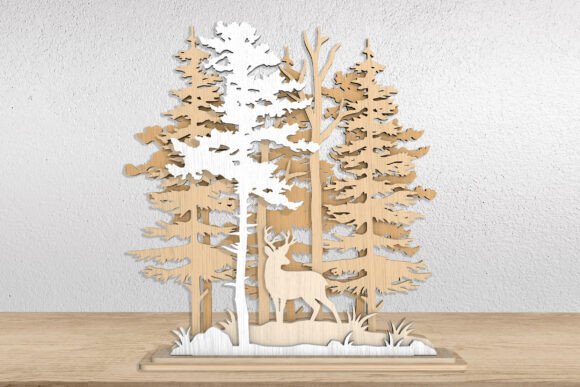
Creating Depth and Serenity with Layered Forest Deer Wooden Decor SVG Designs
The intersection of digital design and traditional craftsmanship has opened new avenues for creators seeking to infuse their living and working spaces with natural beauty. Among the most compelling trends in modern laser cutting and woodworking is the use of layered silhouette art. Specifically, the Layered Forest Deer Wooden Decor SVG has emerged as a favorite for hobbyists and professional makers alike. This design style transcends simple flat cutouts by utilizing multiple planes of material to create a convincing illusion of depth, shadow, and perspective. By combining tall pine trees, a graceful deer silhouette, and strategic layering, artisans can produce wall art that captures the quiet majesty of a woodland scene.
Understanding how to effectively utilize these digital files requires more than just a laser cutter; it demands an appreciation for spatial design and material selection. The appeal of this specific motif lies in its versatility. It serves not only as a decorative piece but also as an educational tool for understanding how two-dimensional vectors can be manipulated to achieve three-dimensional results. Whether you are a seasoned woodworker looking to expand your product line or a beginner eager to start your first complex project, mastering the nuances of layered forest designs offers significant creative rewards.
The Aesthetic Appeal of Layered Woodland Art
The primary advantage of using a Layered Forest Deer Wooden Decor SVG is the atmospheric quality it brings to a room. Unlike flat prints or single-layer cuts, layered wood art interacts with ambient light. As light hits the different depths of the pine trees and the foreground deer, subtle shadows are cast, enhancing the realism of the scene. This dynamic interaction changes throughout the day, making the artwork feel alive and responsive to its environment.
The composition typically features a background layer of distant mountains or sky, followed by mid-ground layers of dense pine forests, and finally, a foreground layer featuring the deer. This separation allows for the use of different wood stains or paints on each layer, further emphasizing the depth. For instance, lighter woods like maple or birch might be used for the background to suggest distance, while darker woods like walnut or stained oak could define the foreground elements. This technique mimics atmospheric perspective, a concept often used in traditional painting, but achieves it through physical structure rather than color gradient alone.
Technical Specifications and File Compatibility
When acquiring digital assets for laser cutting, file compatibility is paramount. A high-quality package for a Layered Forest Deer Wooden Decor SVG should provide a comprehensive suite of vector formats to ensure seamless integration with various software and hardware ecosystems. Typically, users will receive a ZIP file containing SVG, AI, DWG, EPS, DXF, and PDF files. Each format serves a specific purpose in the workflow of digital fabrication.
- SVG (Scalable Vector Graphics): Ideal for web-based design tools and many consumer-grade laser cutters. It preserves vector data without rasterization.
- AI (Adobe Illustrator): The industry standard for professional graphic designers, allowing for easy editing of nodes and paths.
- DXF and DWG: Preferred by users of CAD software such as AutoCAD or SolidWorks, ensuring precision in engineering-focused workflows.
- EPS and PDF: Versatile formats that maintain vector integrity across different operating systems and design applications.
It is crucial for buyers to verify that their specific machine and software support these file types before purchasing. For example, users of Glowforge machines will find the SVG and PDF formats particularly useful, as they import cleanly and allow for easy assignment of cut and engrave operations. The design usually comes with a default height of 10 inches, but because these are vector files, they can be scaled up or down without any loss of quality. This scalability allows creators to adapt the design for small shelf decor or large statement wall pieces.
Workflow Optimization: Cutting and Engraving Strategies
Executing a layered design requires a methodical approach to cutting and assembly. In a typical Layered Forest Deer Wooden Decor SVG, the file is organized with color-coded lines to distinguish between different operations. Generally, blue lines indicate engraving areas, while red lines denote cutting paths. This visual coding simplifies the setup process in laser control software, reducing the risk of errors during production.
To achieve the best results, consider the following workflow steps:
- Material Preparation: Select wood sheets that are uniform in thickness. Variations in thickness can cause alignment issues when stacking layers. Plywood is a popular choice due to its stability and attractive edge grain, which becomes visible in layered designs.
- Test Cuts: Always perform test cuts on scrap material to determine the optimal power and speed settings for your specific laser tube and wood type. This ensures clean edges and minimizes charring.
- Layer Organization: Keep the cut layers organized immediately after processing. Labeling each layer (e.g., Background, Mid-ground Trees, Foreground Deer) prevents confusion during assembly.
- Sanding and Finishing: Lightly sand the edges of each piece to remove soot or roughness. Apply stain or paint before assembly if you plan to use contrasting colors for different depths.
- Assembly: Use spacers or foam core between layers to create consistent gaps. This not only enhances the 3D effect but also makes cleaning easier, as dust will not settle in tight crevices.
Applications Beyond Wall Decor
While wall art is the most common application for a Layered Forest Deer Wooden Decor SVG, the design’s modular nature allows for diverse creative implementations. Educators and workshop leaders can use these files to teach students about vector graphics, spatial reasoning, and material science. The clear distinction between layers makes it an excellent case study for understanding how complex images are deconstructed for manufacturing.
For business owners and entrepreneurs, these designs offer a pathway to product diversification. The same vector files can be adapted for creating custom greeting cards, intricate box lids, or even lampshades. By inserting LED strip lights behind the layers, the silhouette of the deer and trees can be illuminated, creating a stunning night light or ambient lamp. This transformation from static decor to functional lighting adds significant value to the final product.
Furthermore, the theme of nature and wildlife resonates strongly with consumers interested in rustic, cabin, or eco-friendly aesthetics. Retailers can market these items as sustainable decor options, especially when using reclaimed wood or eco-friendly finishes. The emotional connection people have with wildlife imagery enhances the perceived value of the piece, making it a thoughtful gift for housewarmings, birthdays, or holidays.
Considerations for Digital Product Users
It is important to remember that purchasing a Layered Forest Deer Wooden Decor SVG involves acquiring a digital product, not a physical item. Success with this purchase depends largely on the user’s proficiency with their chosen software and hardware. Basic knowledge of how to import, scale, and assign toolpaths in laser cutting software is required. Beginners may need to invest time in tutorials to understand how to manage layer order and cut settings effectively.
Additionally, users should be aware of the limitations of their equipment. Not all laser cutters can handle thick materials or multiple passes efficiently. Ensuring that your machine supports the necessary file formats and has the bed size to accommodate the desired dimensions is essential. For those using CNC routers instead of lasers, the DXF or DWG files provided in the package will be particularly valuable, allowing for precise milling of the layered components.
By approaching the project with patience and attention to detail, creators can transform simple vector lines into tangible works of art. The Layered Forest Deer Wooden Decor SVG stands as a testament to the power of digital fabrication, bridging the gap between virtual design and physical beauty. Whether for personal enjoyment, educational purposes, or commercial venture, mastering this design opens up a world of creative possibilities rooted in the tranquility of the natural world.